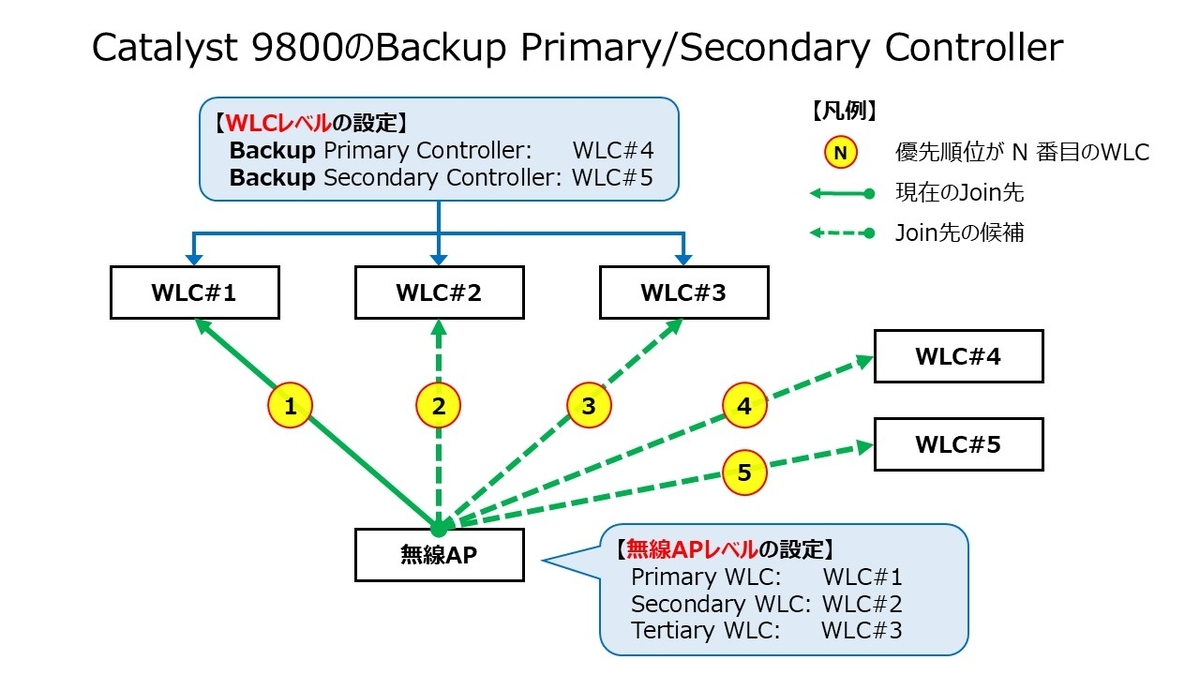
Catalyst 9800には「無線APのWLCへの帰属」に関与するBackup Primary ControllerおよびBackup Secondary Controllerの設定があります。
用語の先頭に「Backup」のワードがある点に着目してください。Primary WLCやSecondary WLCとは別物の設定であり、混同しないように意識が必要です。
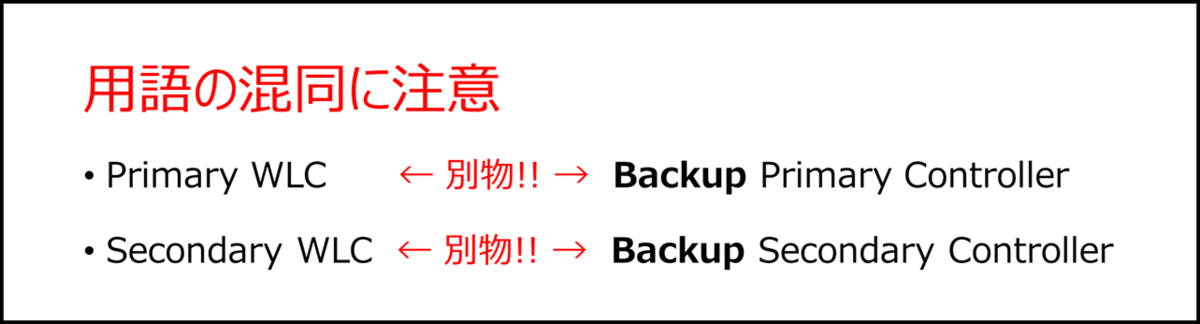
Backup Primary/Secondary Controllerは無線APの帰属の優先度に影響を与える設定です。順を追って関連情報を整理します。
- 前提知識
- WLCへ帰属する際の優先度
- Backup Primary/Secondary Controllerの前提条件
- Backup Primary/Secondary Controllerの指定の仕方
- 設計の観点
- 設定方法
- 設定状況の確認方法
- 情報源
- 関連記事
前提知識
まず無線APがWLCに帰属する際の優先度に影響を与える設定の分類が2種類あります。
無線APレベルの設定
無線AP自体に保持されます。WLCのコンフィグとしては残りませんが、WLC側にてAP Primingと呼ばれる機能を用いて効率化できます。WLCレベルの設定
WLCのコンフィグとして残ります。AP Join Profileで設定します。
備考: AP Primingに関しては、本記事の最後にある関連記事を参照してください。
WLCへ帰属する際の優先度
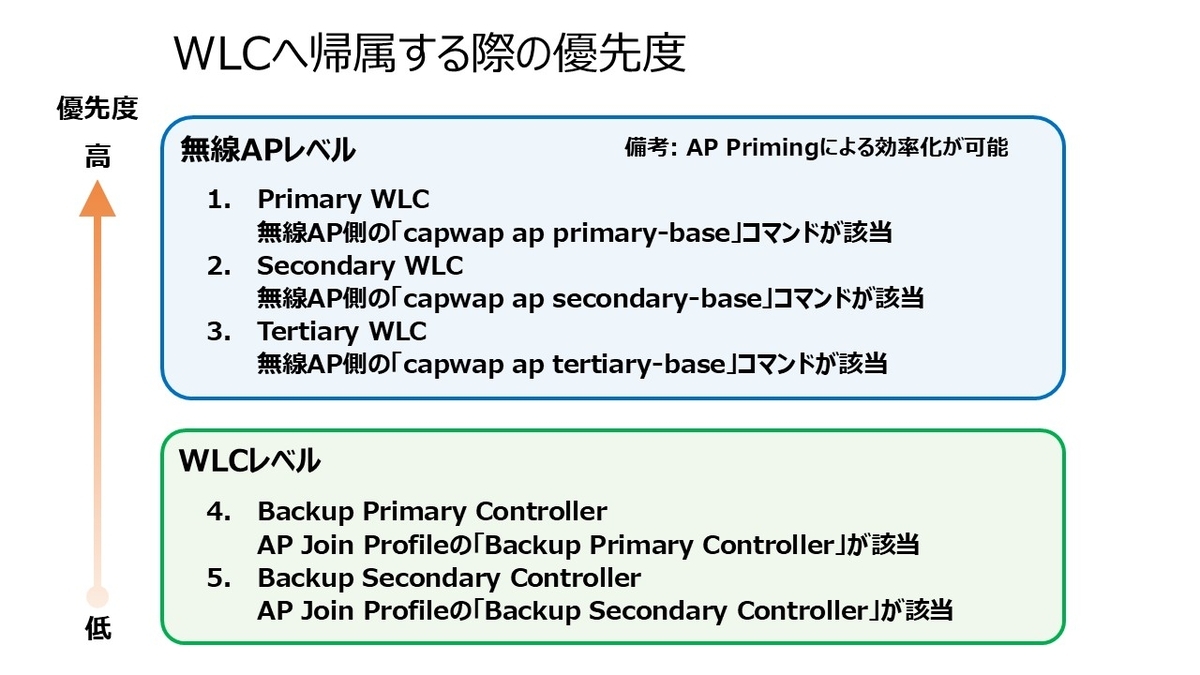
- 無線APレベルのPrimary WLC
- 無線APレベルのSecondary WLC
- 無線APレベルのTertiary WLC
- WLCレベルのBackup Primary Controller ← 本記事で紹介する機能
- WLCレベルのBackup Secondary Controller ← 本記事で紹介する機能
Backup Primary/Secondary Controllerの前提条件
Fast Heartbeat Timeoutの設定が「1 以上 (1~10)」である必要があります。デフォルト値の「0」だとBackup Primary/Secondary Controllerは無効化されています。
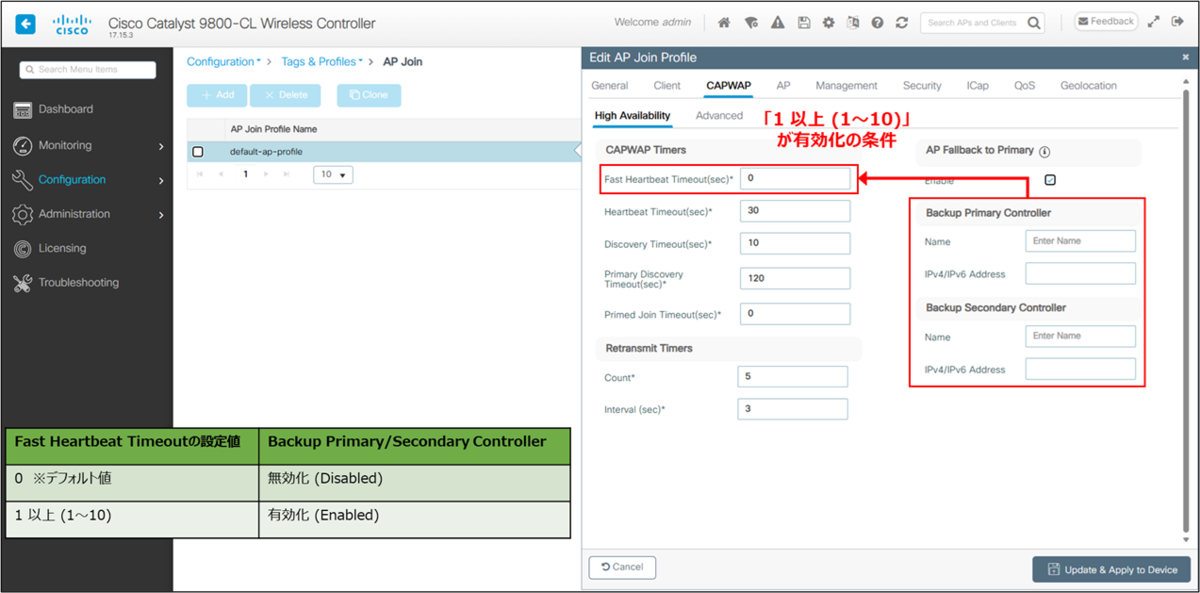
本条件に関しては、Fast Heartbeat Timeoutを「0」のままにして設定していると、Web UIで警告として表示されます。
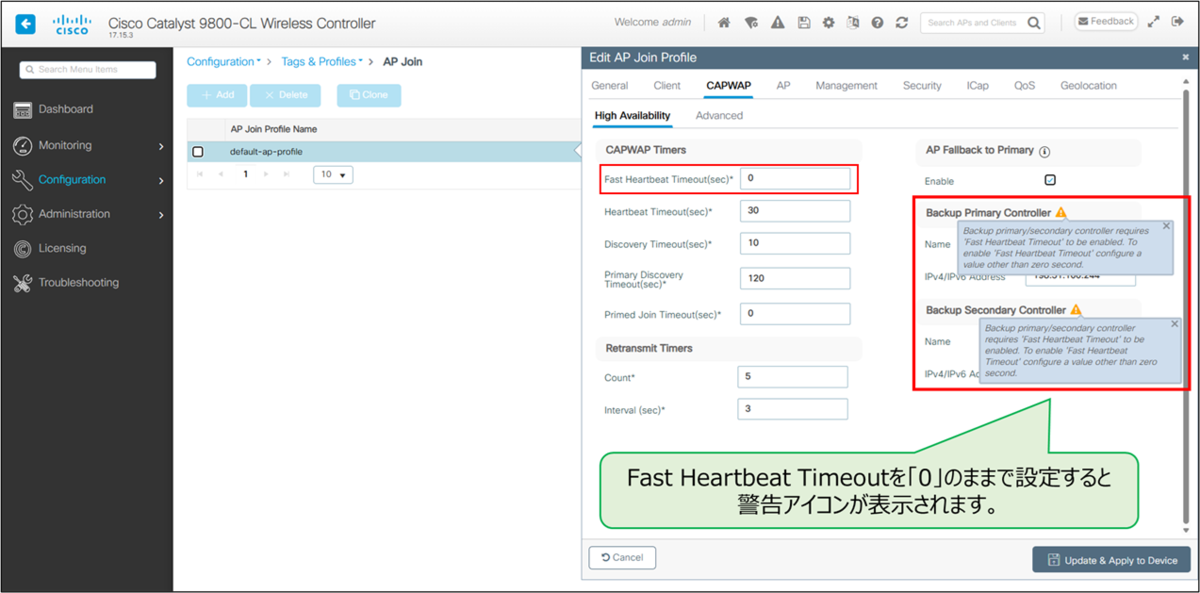
警告メッセージの内容を下記に控えておきます。
Backup primary/secondary controller requires 'Fast Heartbeat Timeout' to be enabled. To enable 'Fast Heartbeat Timeout' configure a value other than zero second.
Backup Primary/Secondary Controllerの指定の仕方
「無線APの帰属先のWLC」から見た次のFail Over先がBackup Primary Controllerになります。そのためWLC#1とWLC#2が構成される環境の場合は、下記のような指定の仕方になります。
| 設定対象 | Backup Primary Controller | Backup Secondary Controller |
|---|---|---|
| WLC#1 | WLC#2 | 設定なし |
| WLC#2 | WLC#1 | 設定なし |
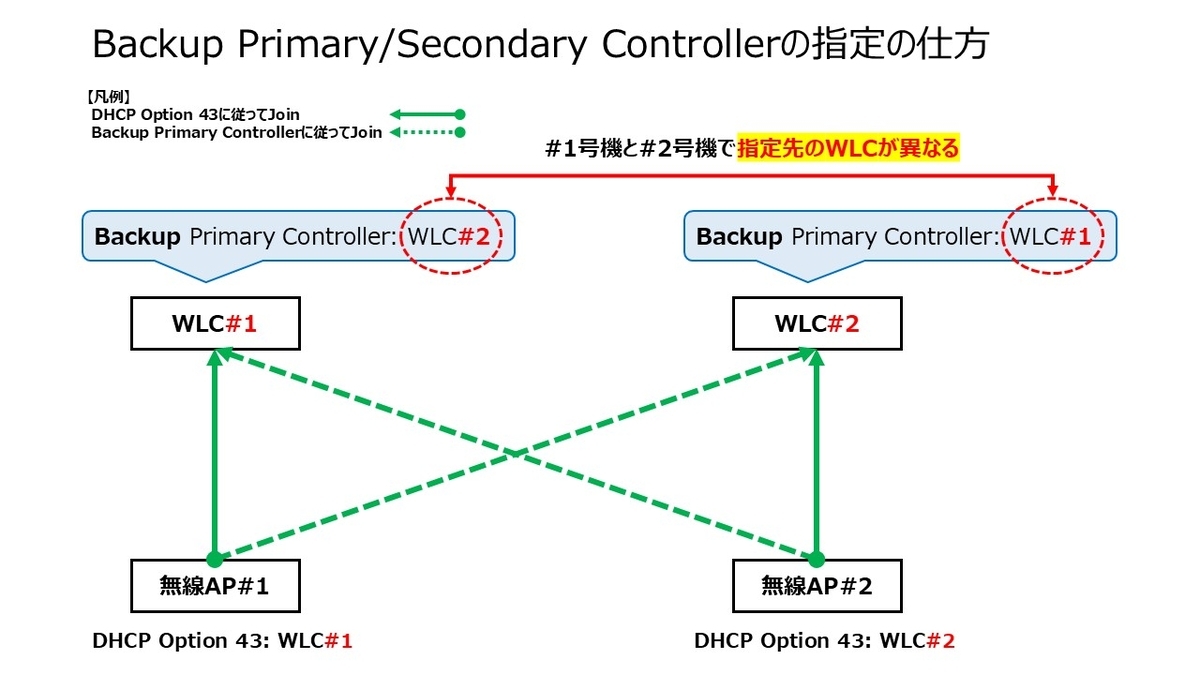
WLCが障害時の挙動のイメージを掲載します。
ACT-ACT構成におけるWLC#1の障害時
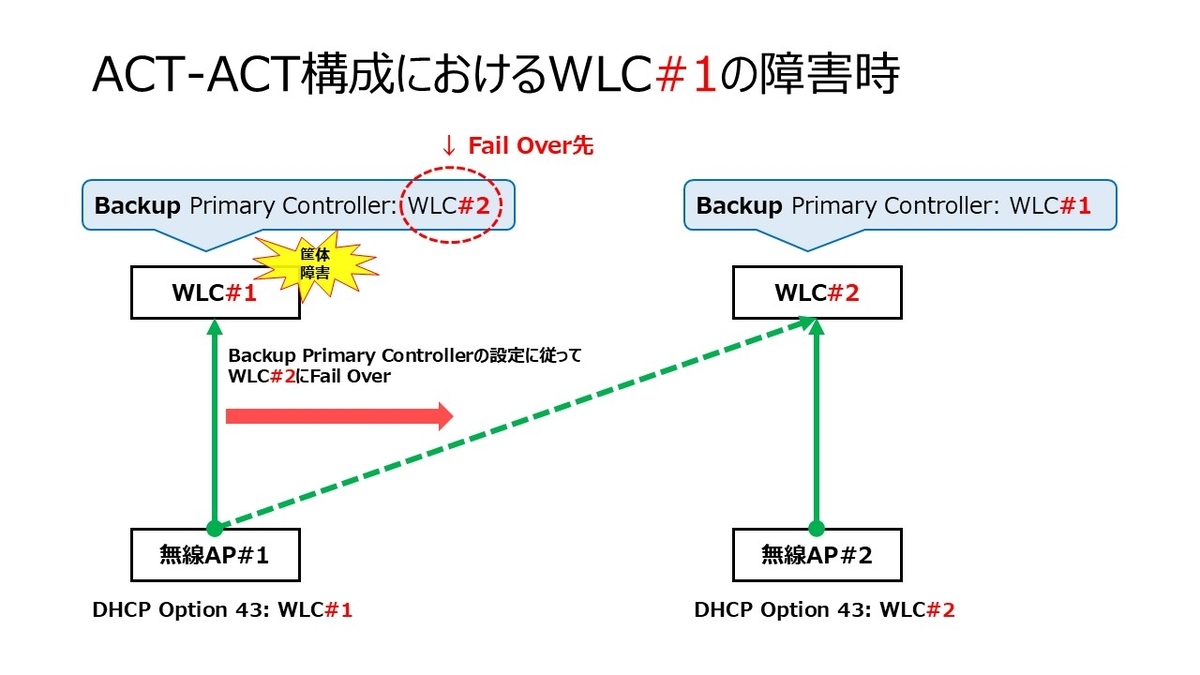
ACT-ACT構成におけるWLC#1の障害時 ACT-ACT構成におけるWLC#2の障害時
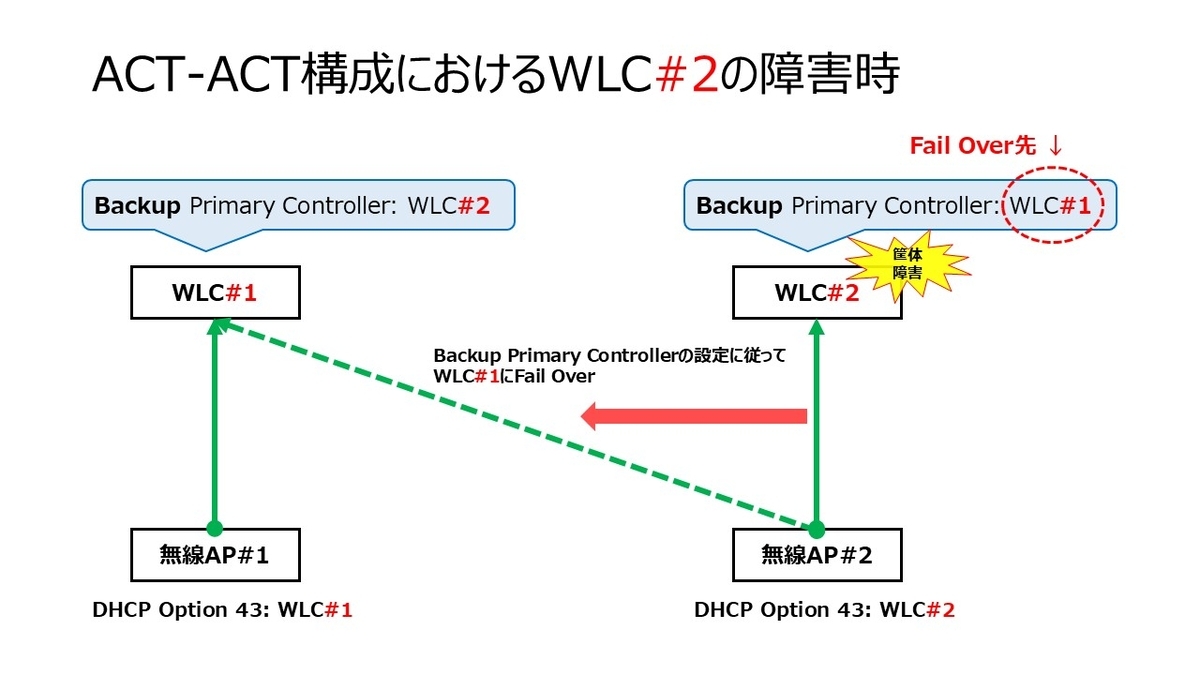
ACT-ACT構成におけるWLC#2の障害時
設計の観点
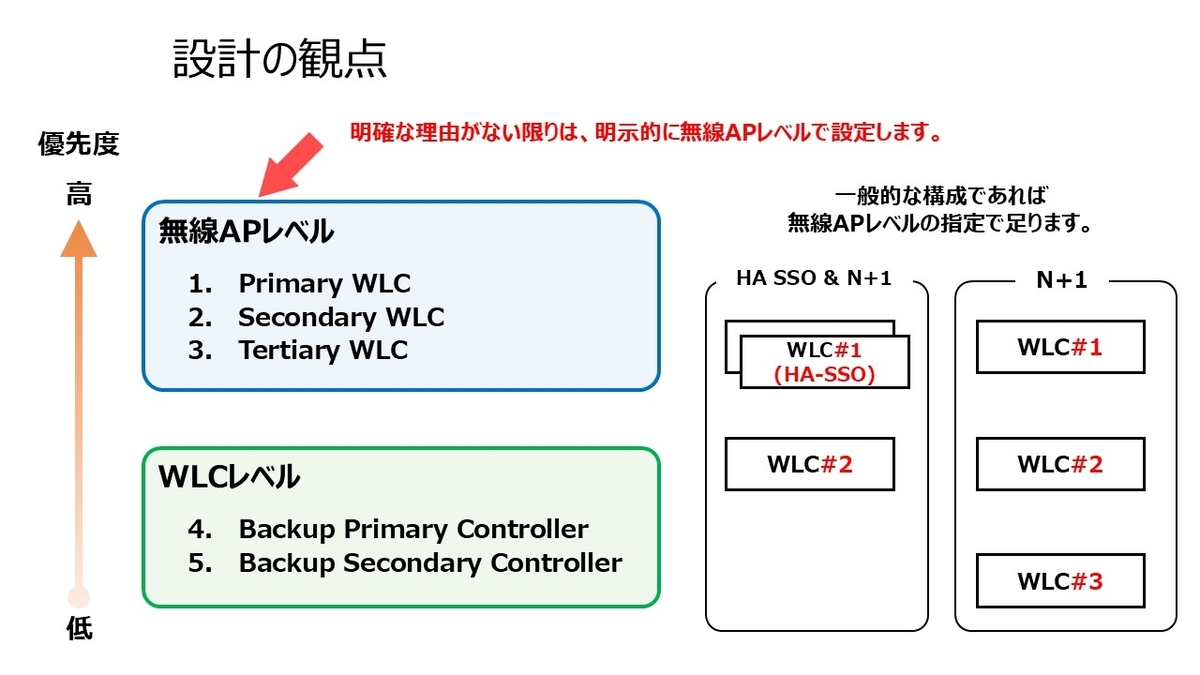
明確な理由がない限りは、明示的に無線APレベルのPrimary/Secondary/Tertiary WLCを設定します。
数百台や数千台レベルと数が多くなりがちな無線APでは、無線APレベルでの手動設定は手間暇がかかるので、WLCレベルで設定が可能なBackup Primary/Secondary Controllerを利用する設計意図もあります。しかし、現在ではAP Primingによる設定の効率化が行えます。
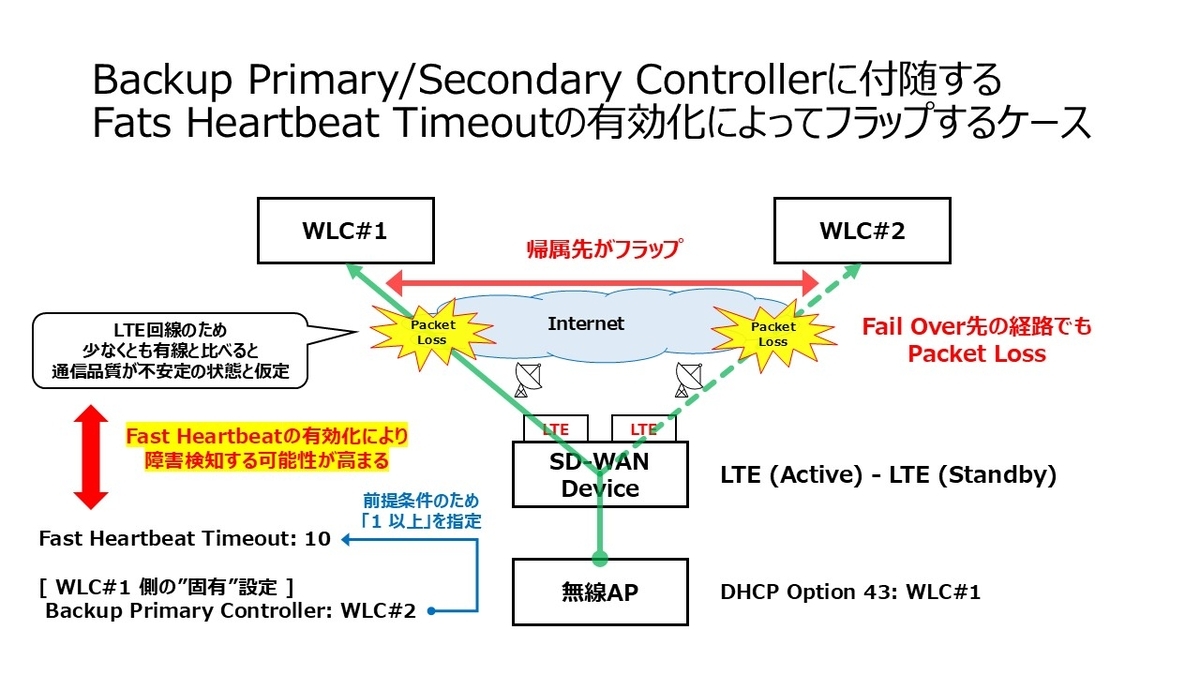
Fast Heartbeat Timeoutを有効化すると、短い間隔で到達性を判定するため、回線品質が不安定な拠点では一時的な遅延・ロスを障害と誤判定し、無線APが別のWLCへ再Join (再帰属)を試みることで帰属がフラップすることがあります。 特にWAN越えの環境でFast Heartbeat Timeoutを設定すると顕在化しやすくなります。代表的なシナリオとして、SD-WANでLTE回線を利用中の拠点では、LTE回線の品質が有線ほど安定しないため、最大値の「10」であってもフラップする可能性が高まる場合があります。
そのため、WAN越えの環境ではBackup Primary/Secondary Controllerの利用可否は、Fast Heartbeat Timeoutの設定値とセットで検討する必要があります。
設定方法
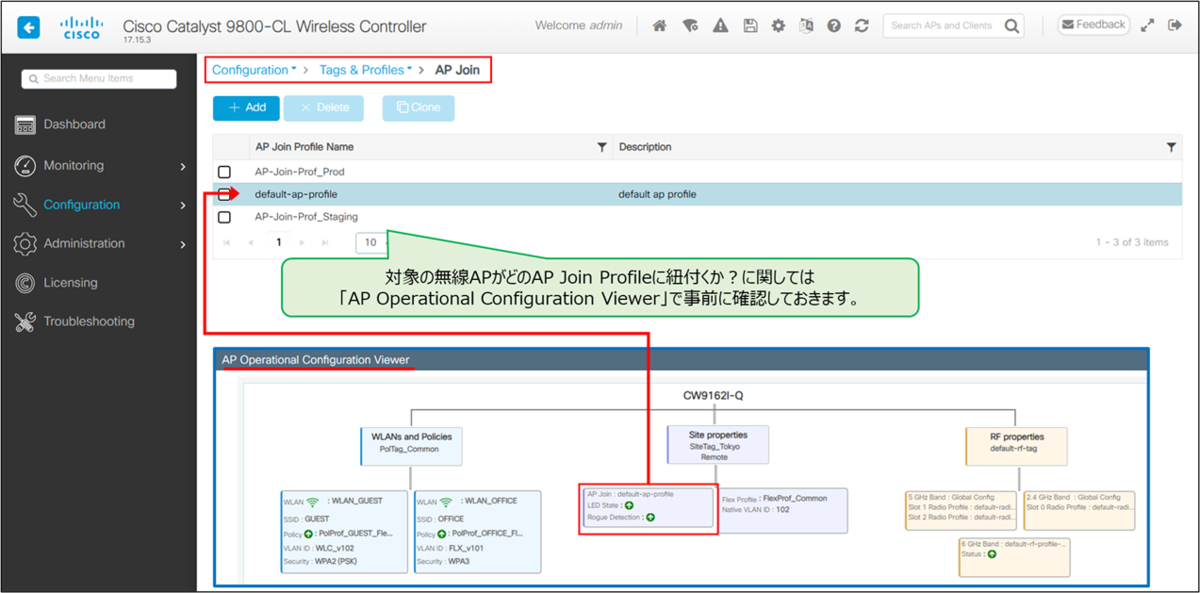
AP Join Profile内で設定を行います。全てのAPはデフォルト状態だと default-ap-profile のAP Join Profileに紐付きます。
対象の無線APがどのAP Join Profileに紐付いているか分からない場合は、「AP Operational Configuration Viewer」で視覚的に確認できます。
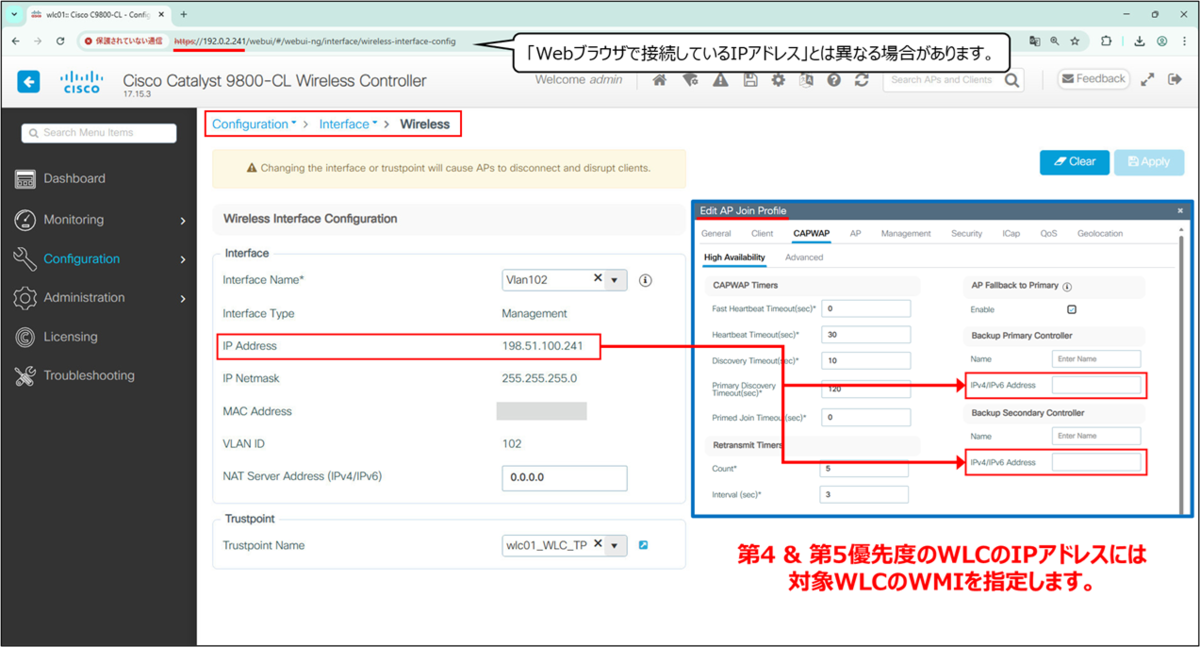
注記: Backup Primary/Secondary ControllerのIPアドレスはWMI (Wireless Management Interface)を指定します。
Web UI
メニュー「Configuration > Tags & Profiles > AP Join」に移動して設定対象のAP Join Profileを選択します。
対象のAP Join Profileの選択 AP Join Profile内の「CAPWAP タブ > High Availability タブ」に移動します。
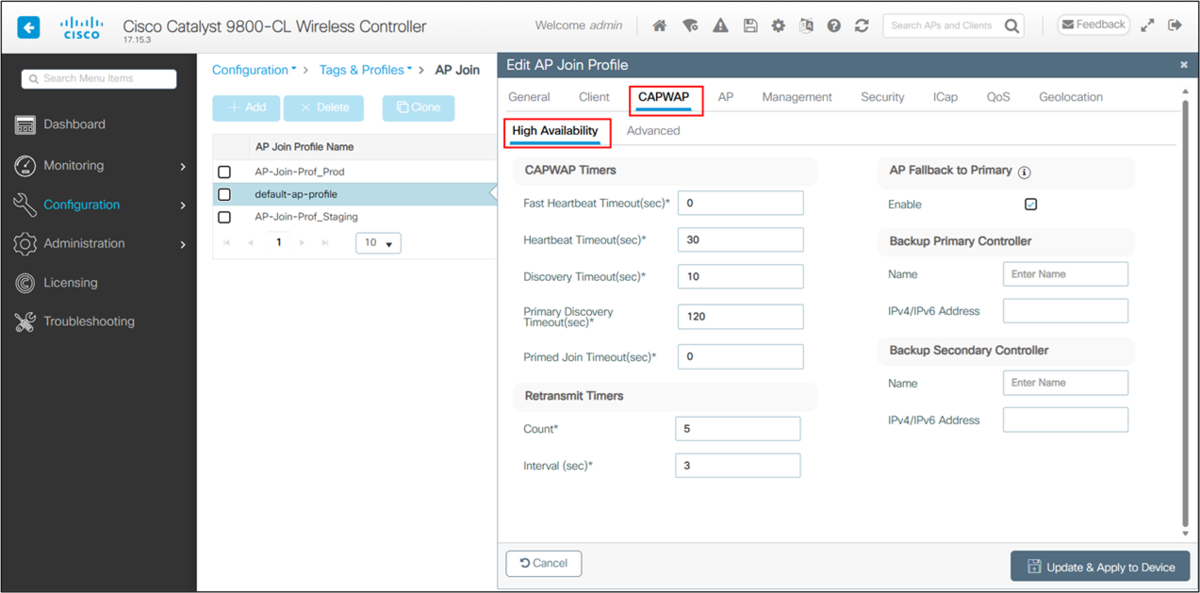
Backup Primary/Secondary Controllerの設定個所 要件に応じて設定します。
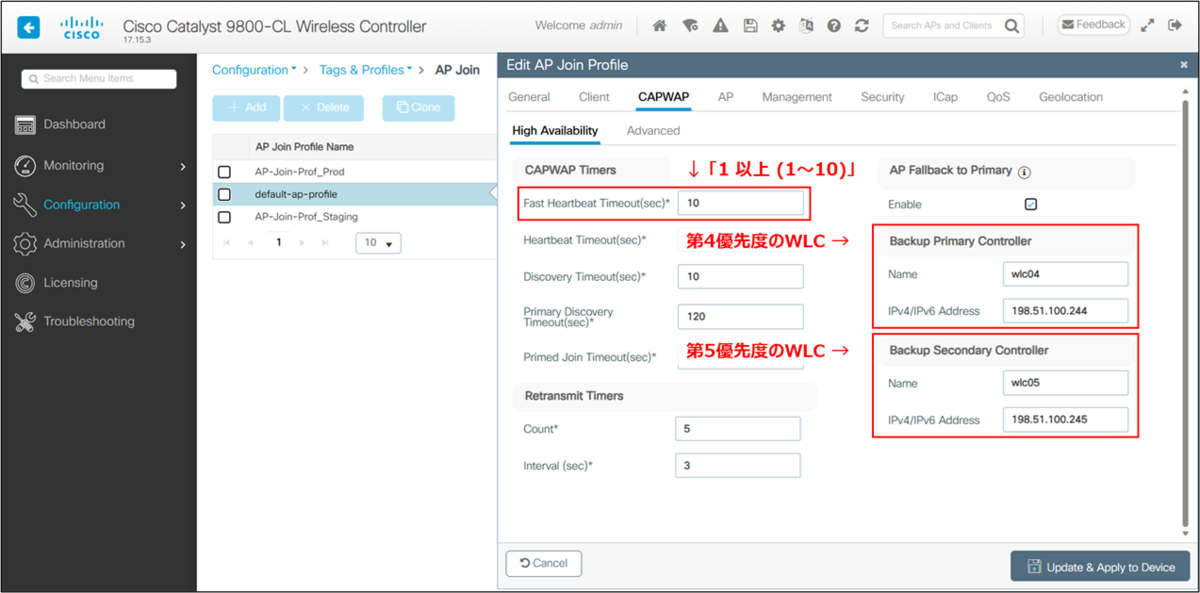
要件に応じて設定 (一例) 「Fast Heartbeat Timeout」を「1 以上 (1~10)」に指定します。
「Backup Primary Controller」に第4優先度のWLCを指定します。
任意: 「Backup Secondary Controller」に第5優先度のWLCを指定します。第4優先度までしかWLCが居ない場合は、指定不要です。
動作の確認後は、右上のフロッピー ディスクのアイコンから設定を保存します。

設定の保存
CLI
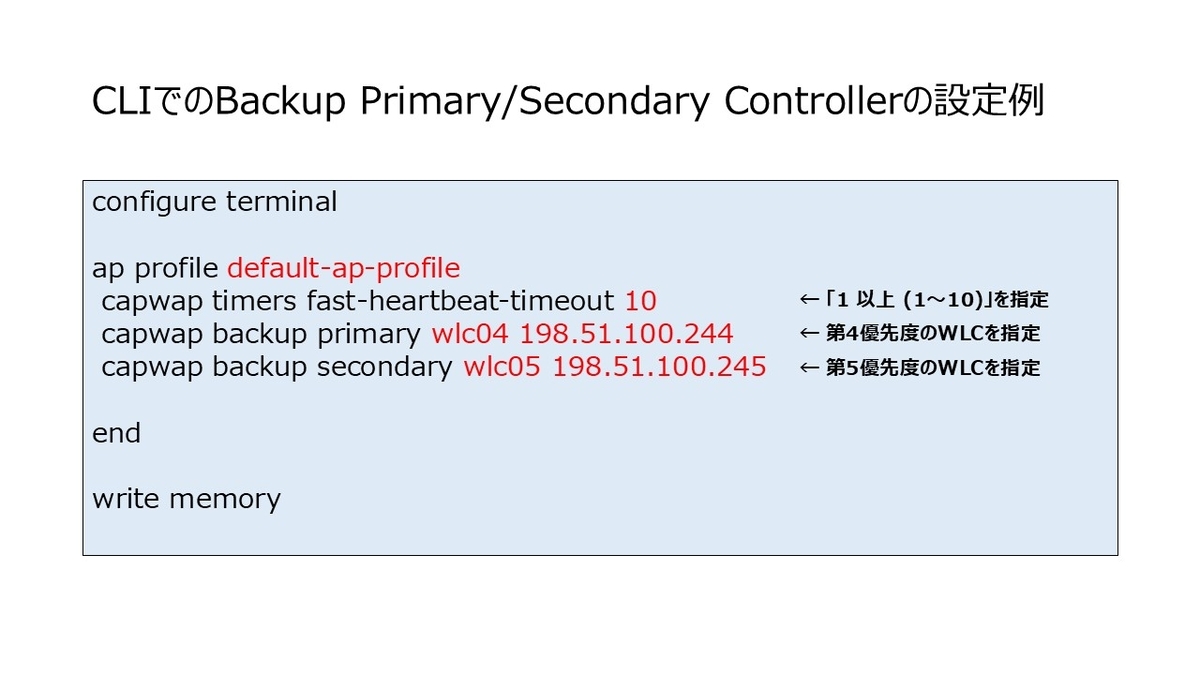
CLIでのコマンドの書式は下記になります。
configure terminal

ap profile <AP-Join-Profile-Name>
 capwap timers fast-heartbeat-timeout <1-10>
 capwap backup primary <WLC-Name> <WLC-IP>
 capwap backup secondary <WLC-Name> <WLC-IP>

end

write memory
設定状況の確認方法
無線AP側では下記のコマンドで確認できます。
show capwap client ha
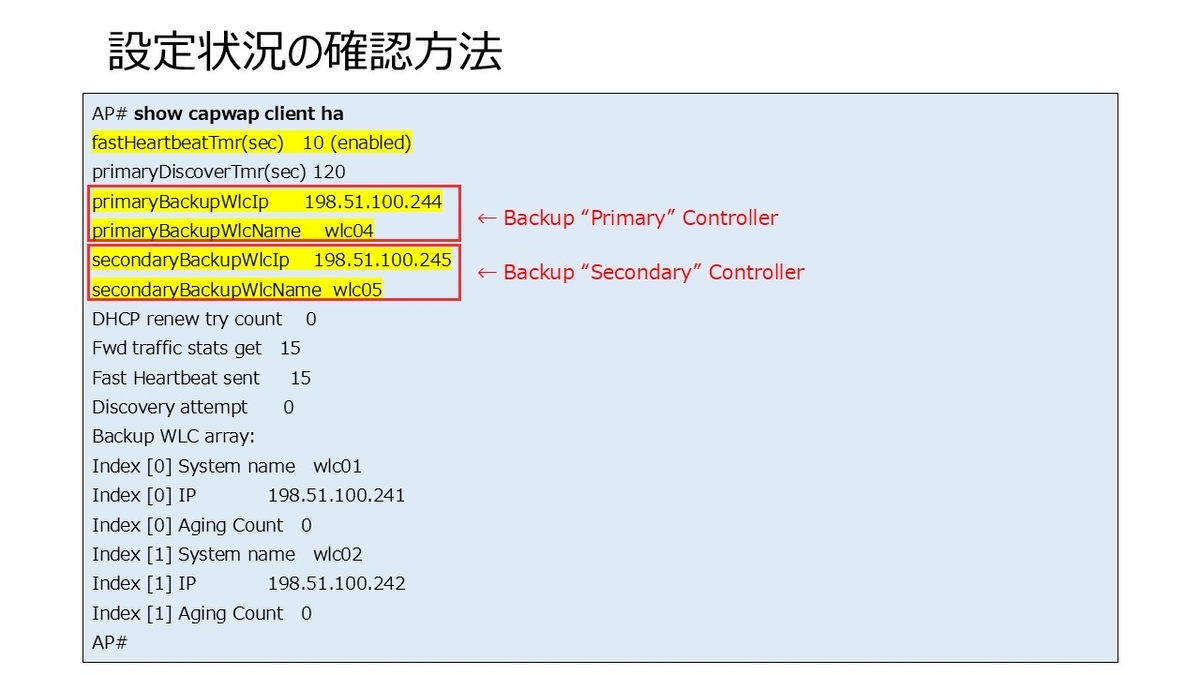
下記は出力結果のサンプルです。
AP# show capwap client ha
fastHeartbeatTmr(sec)   10 (enabled)
primaryDiscoverTmr(sec) 120
primaryBackupWlcIp      198.51.100.244
primaryBackupWlcName    wlc04
secondaryBackupWlcIp    198.51.100.245
secondaryBackupWlcName  wlc05
DHCP renew try count    0
Fwd traffic stats get   15
Fast Heartbeat sent     15
Discovery attempt      0
Backup WLC array:
Index [0] System name   wlc01
Index [0] IP            198.51.100.241
Index [0] Aging Count   0
Index [1] System name   wlc02
Index [1] IP            198.51.100.242
Index [1] Aging Count   0
AP#
出力の内容より、
(1) 「fastHeartbeatTmr」が「enabled」になっていること、
(2) 「primaryBackupWlcIp / secondaryBackupWlcIp」が意図した値になっていることを確認します。
情報源
Best Practicesの「Primary/secondary/tertiary versus backup primary/backup secondary」セクションに関連する記述があります。
Primary/secondary/tertiary versus backup primary/backup secondary
There is an important difference between primary/secondary/tertiary and backup primary/backup secondary:
● Primary/secondary/tertiary WLCs are configured and saved at the AP level (they are not saved globally in the WLC nor in the AP Join profile). When the primary is set or changed, the AP will do a CAPWAP reset and join the new configured controller.
● Backup primary/backup secondary settings are configured at the WLC level in the AP Join Profile and are pushed to APs. These are only used when primary, secondary and tertiary are not responsive.
It is important to understand the different behavior between the two types of redundancy controllers:
● If an AP’s cannot reach its currently joined controller, the AP collects all the discovery responses and then the AP chooses an available controller from the list in this order: primary, secondary, tertiary, primary backup, and secondary backup.
● AP fallback (described in the previous section) applies only to the primary controller and no other controller.
関連記事
無線APの帰属設定
無線APレベルの手動 (Static)での帰属の設定方法は下記の記事を参照してください。
Catalyst 9100 (無線AP)をCatalyst 9800 (WLC)に手動設定でJoinさせる - My Home NW Lab
https://myhomenwlab.hatenablog.com/entry/2024/12/01/172658
AP Priming
無線APの帰属設定を効率化したいのであれば、AP Primingの機能があります。
Catalyst 9800のCLIからのAP Primingの設定方法と動作の整理 - My Home NW Lab
https://myhomenwlab.hatenablog.com/entry/2024/05/12/164138
Catalyst 9800のWeb UIからのAP Primingの設定 - My Home NW Lab
https://myhomenwlab.hatenablog.com/entry/2024/11/28/224113
